
WIX SEO
What will your Wix product titles look like in Google?
In Wix, one pattern sets the title of every product at once. It can set the description too. The default title is the product name, a bar (|), then your site name. Google cuts long titles to fit the screen and may show other words. So check the pattern against your real product names, then change only the few that need it.
In this guide
1. Find the pattern that writes your titles
- In your site’s dashboard, go to SEO & GEO.
- Scroll down to Tools and settings. Click SEO Settings.
- Select Products.
- Click the Customize defaults tab.
- Click Edit next to Basics & social share. The Title tag field holds your pattern.
A pattern is one rule that sets the title tag of every product at once. A title tag is the title you give a page for search results.
Wix’s help writes the default as {{Product Name | Site Name}}. Read it as the product’s name, a straight bar, then your site name. Product Name and Site Name are variables: details Wix fills in for each product. So Cedar Smoke Candle, on a made-up site named Juniper & Oak Candle Co., gets the title “Cedar Smoke Candle | Juniper & Oak Candle Co.” Site Name is the name in your Website Settings.
To change the pattern, click the Title tag field. Use + Add Variable to add a detail, or type plain words. Then click Save.
To give one product its own title, open it in your dashboard. Click Edit SEO Settings under Marketing & SEO, then the Basics tab. Type the title and click Save. A title set there overrides the pattern for that product only. To see one product’s result, look under Preview on Google in the same place.
These steps are in your dashboard, not the editor, so they are the same in the Wix Editor and Wix Studio. The labels match Wix’s help in October 2026. Wix may rename them.
Sources: Wix: Default SEO settings for each page typeWix: Customizing your SEO SettingsWix: Using variables in SEO SettingsWix Stores: SEO settings for product pagesWix: Previewing how your page looks in Google
2. Why Google cuts or changes your title
| Source | Title length advice |
|---|---|
| Wix Stores product help | At most 60 characters |
| Wix title tag help | Under 60 characters |
| Wix SEO Setup Checklist | 55 to 70 characters |
| Google Search help | No limit |
Wix’s own pages don’t agree, and Google gives no number at all. Google sets no length limit, but its help says to avoid long, wordy titles. It usually cuts a long title to fit the width of the screen. So a character count is only a rough guide.
Google also picks the title it shows. It can use your page’s main heading or other text on the page instead of your title tag. After you change a title, Google may take a few days to a few weeks to notice.
So don’t aim for one exact number. A cut title loses its end, so put the words a shopper needs first: the product name. Wix’s default already does that. Keep your site name short, because the default adds it to every title.
Sources: Wix Stores: SEO settings for product pagesWix: Adding SEO title tags and meta descriptionsWix: SEO Setup Checklist, homepage title tagGoogle: How title links work in search results
3. Does each product need a meta description?
A meta description is the short summary you can set for search results. Here Wix’s pages disagree too. Wix’s table of default settings says a product’s meta description is blank until you enter one. Wix’s Stores help says the default is the product description. So check one of your own product pages.
Wix’s SEO Settings help says Wix adds nothing to a pattern’s description by default. The reason: Google often writes its own from the page, to match each search. So if an SEO checker says your descriptions are missing, Wix says that is not an issue.
Want one anyway? Add the Product Description variable to your pattern’s Meta description field. Two cautions. A product description can be long, and Wix’s Stores help suggests at most 156 characters. Google sets no limit and cuts the text to fit the screen. And products that share the same text, such as copy from a supplier, will share the same description too.
To see what one product page has, paste its page source into the page checker. It shows what Google can read on that page.
Sources: Wix: Default SEO settings for each page typeWix Stores: SEO settings for product pagesWix: Customizing your SEO SettingsGoogle: How snippets and meta descriptions work
4. Variables you can use
| Variable | What it fills in | Watch out for |
|---|---|---|
| Product Name | The product’s name | Same name, same title |
| Product Description | Its description | Can be long or repeated |
| Product Brand | Its brand | Some products have none |
| Product SKU | Its stock code | Only if you set SKUs |
| Product Price | Its current price | Can go out of date |
| Site Name | Your site’s name | Repeats in every title |
| Category Name | The category’s name | Category pages only |
| Category Description | Start of its description | Category pages only |
A variable is a placeholder. Wix fills it in with each product’s own detail. In the dashboard, you add one with + Add Variable. The curly brackets in this guide are how Wix’s help writes patterns down.
Words you type into a pattern appear in every title. Add “Soy Candles” to the pattern, and every product carries those words. Google’s help says to avoid repeated or boilerplate text in titles.
A price in a title can be out of date in search results. Google may take days or weeks to see a change.
Sources: Wix: Using variables in SEO SettingsWix: Customizing your SEO SettingsGoogle: How title links work in search results
5. Get all your product names in one file
- Open any product in your dashboard. If its first field is “Images and videos”, you have the previous version of Wix’s product creation page.
- Go to Store Products. Click More Actions, then Import.
- New version: click Export Products.
- Previous version: click Download CSV File, then Wix CSV with your products.
- Open the file. On a Mac, Wix says to use Numbers or Excel version 15 or higher.
To test a pattern before you save it, you need every product name in one place. The export file, a CSV spreadsheet, has your product names, descriptions and prices. For the previous version, Wix says the file skips digital products and holds up to 5,000 products.
It has no title tag or meta description columns. Wix says you can’t export the SEO tags you added, so titles you set by hand on single products are not in it. Some rows hold a product’s images or options. Use only the rows that the fieldType column marks as products. These labels match Wix’s help in October 2026.
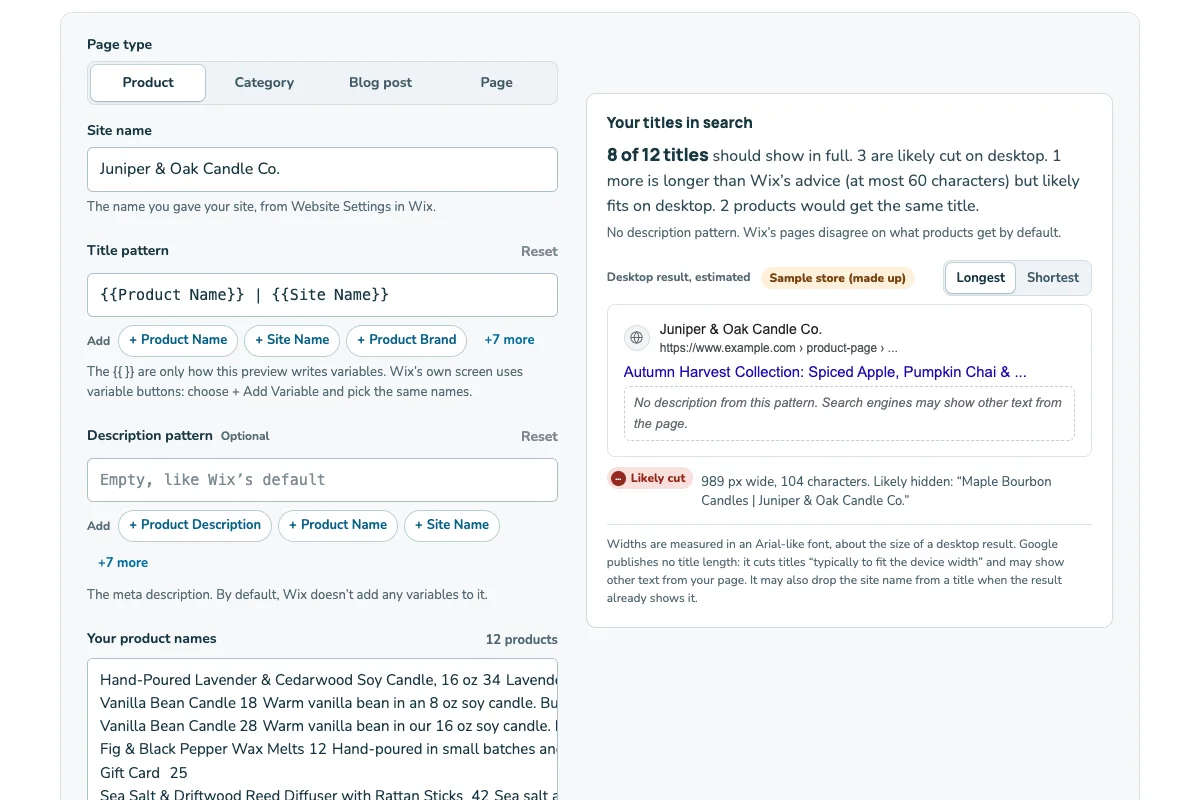
Then open the SEO title preview. It shows how your title and description pattern reads across your product names.
Sources: Wix Stores: Exporting and importing productsWix Stores: Editing many products at once (CSV download)Wix: Exporting SEO tags is not possible
6. Fix what the preview shows
| Product name | Title it makes | Characters | What to expect |
|---|---|---|---|
| Cedar Smoke Candle | Cedar Smoke Candle | Juniper & Oak Candle Co. | 45 | Likely shown in full |
| Lavender Field Soy Candle, 12 oz Jar | Lavender Field Soy Candle, 12 oz Jar | Juniper & Oak Candle Co. | 63 | May be cut |
| Fig & Black Tea Wood Wick Candle, Large 3-Wick Tin | Fig & Black Tea Wood Wick Candle, Large 3-Wick Tin | Juniper & Oak Candle Co. | 77 | Likely cut |
| Holiday Gift Set | Holiday Gift Set | Juniper & Oak Candle Co. | 43 | Same title as row 5 |
| Holiday Gift Set | Holiday Gift Set | Juniper & Oak Candle Co. | 43 | Same title as row 4 |
The character counts are exact. The last column is only a rough guess, because Google cuts by screen width. Row 2 is over Wix’s Stores advice of 60 but inside the Checklist’s 55 to 70. Row 3 is over all three. Rows 4 and 5 make the same title.
A pattern can’t shorten one long name. Shorten the name in your store instead: “Fig & Black Tea Candle, Big Tin” makes a 58-character title, inside all three of Wix’s numbers. Or keep the long name on the page and give that product its own title in Edit SEO Settings.
For the two gift sets, add what makes each one different, such as “Holiday Gift Set, Red Box”. Google’s help says the same title on many pages makes them hard to tell apart.
Wix makes a product’s web address from its name. After you rename a product, check its address. If it changed, make sure the old address redirects to the new one.
A shorter site name helps every row. Juniper & Oak instead of Juniper & Oak Candle Co. leaves 11 more characters for each product. But it changes your site name everywhere Wix uses it.
If an address changed, see Wix 301 redirects to send visitors from the old address to the new one.
Sources: Wix Stores: SEO settings for product pagesWix: Adding SEO title tags and meta descriptionsWix: SEO Setup Checklist, homepage title tagGoogle: How title links work in search results
7. Category pages work the same way
If your store has category pages, they have their own default title in SEO Settings. Wix’s default is {{Category Name | Site Name}}, so check category names the same way you check product names.
A pattern worksheet you can copy
Copy this into your notes. Fill it in before you change your pattern.
My product title check
Site name in Website Settings: [name]
Product title pattern today: [copy it from SEO Settings]
Pattern I want to try: [pattern]
Meta description pattern: [blank, Product Description, or other]
Export file date and version: [date, new or previous]
Longest product name: [name and number of characters]
Products with the same name: [names]
Names I will shorten: [old name → new name]
Products that get their own title: [names]
Addresses I checked after renaming: [addresses]
Date I saved the new pattern: [date]
Juniper & Oak Candle Co. is a made-up store. Use your own store’s details.