
WIX SEO
Why are some of my Wix pages not indexed?
Not indexed does not always mean broken: many reasons are normal on Wix. Read the reason for each group, then fix only the pages you want people to find.
In this guide
1. Is “not indexed” a problem?
An indexed page is one Google has stored, so it can appear in search results. Google’s help says a page on the not-indexed list is not always there because of an error.
Google says it’s fine for a page to stay out for good reasons. One is a noindex tag, which asks search engines to skip a page. Others are a duplicate address, or a removed page with no replacement. Wix agrees that not every page gets indexed, and says this is often normal.
What matters is whether the pages you want found are indexed, such as your products and categories.
Google says a site with fewer than 500 pages probably doesn’t need this report. Check key pages one at a time with URL Inspection, the Search Console tool for one address. Wix’s Site Inspection tool can check this too.
Sources: Google: Page indexing reportWix: site or pages not appearing in search resultsGoogle: URL Inspection tool and Request indexing
2. Open the report
- Not connected yet? You need a Premium plan and a connected domain. In your Wix dashboard, open SEO & GEO, then the SEO Setup Checklist. Finish Step 1 and click Connect to Google.
- In Search Console, open Indexing, then Pages (menu names can change). Google calls it the Page indexing report.
- Scroll to the table called “Why pages aren’t indexed.” Each row is one reason.
- Click a row to see example addresses for that reason.
Only site owners and admin collaborators can use the SEO Setup Checklist.
Read the Source column too. It says whether a reason comes from your website or from Google. Google says you can usually fix only the rows where the source is Website.
The example list is a sample. It shows up to 1,000 addresses and may not show them all. You can’t search it for one address, so use URL Inspection for that.
Sources: Wix: connect your site to Google with the SEO Setup ChecklistWix: site or pages not appearing in search resultsGoogle: Page indexing report
3. Reasons that are normal on Wix
Your labels may read slightly differently from the ones here.
Page with redirect: a redirect sends visitors from an old address to a new one, so Google leaves the old address out. Wix lists the usual causes. Your free Wix address now goes to your domain. You set up a 301 (permanent) redirect. Or the http:// or non-www version goes to your main address. Wix says these are normal and don’t affect your ranking. Look closer only if an address goes to the wrong page.
Alternate page with proper canonical tag: a canonical tag is a note in a page’s code that names the main copy. Wix adds one to every page. Google says the main copy is indexed here, so you don’t need to do anything.
Duplicate without user-selected canonical: Google found copies of a page and chose one to show. Google says this is not an error. Look at a few examples. Same page with extra text after a question mark? Leave it. Two products with the same description? Make each page clearly different.
Pages kept out on purpose: Wix keeps blog archive pages out of Google. Pages behind a password or for members only can’t be indexed. If that is what you find under a noindex or blocked reason, leave it.
To change where an old address goes, see how to set up Wix 301 redirects.
Sources: Google: Page indexing reportWix: “Page with redirect” in Search ConsoleWix: site or pages not appearing in search results
4. Reasons worth a look
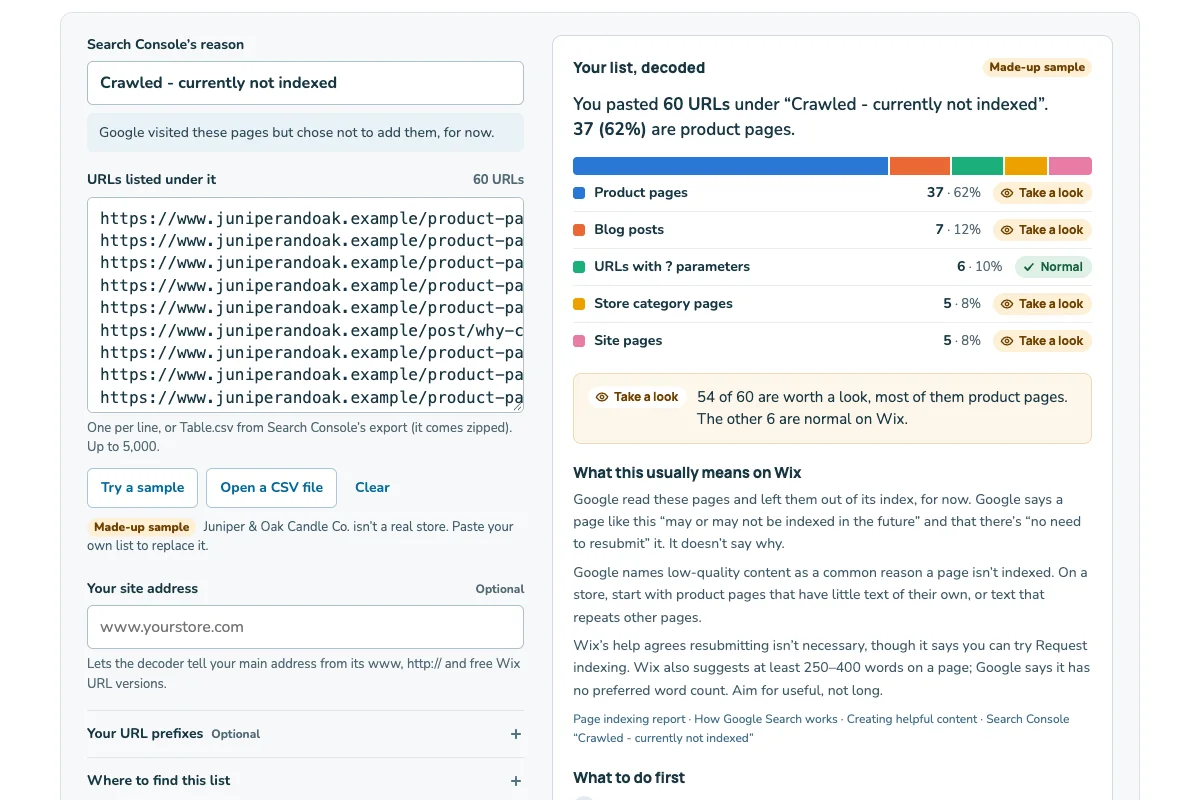
Crawled - currently not indexed: Google crawled the page, meaning its robot visited, but chose not to index it for now. It may or may not index it later. Google gives no reason or fix, and says there’s no need to resubmit the page. Wix says the same. But Wix adds that you can try Request indexing for an important page, if the live test shows no errors. So the two differ on whether to ask. Wix’s page on this label also links to its content quality guidelines.
Discovered - currently not indexed: Google knows the address but hasn’t visited yet. It says it usually puts off the visit so it won’t overload the site. Google gives no fix here either. Give it time, and link to the page from your other pages.
Not found (404) and Soft 404: a 404 is the “page not found” answer. Google says that is fine for a page you removed with no replacement. If the page moved, redirect it. A soft 404 is a page that loads but looks empty or missing to Google. Wix says pages with too little content can get this label.
URL marked ‘noindex’ (your report may say Excluded by ‘noindex’ tag): fine for pages you hide on purpose. If a product you want found is here, check the switches in section 5.
Blocked by robots.txt, 403 or 5xx: robots.txt is a file that tells search engines which addresses to skip. Google says robots.txt blocks are probably on purpose. A 403 means access was refused, and a 5xx means the server failed. On a page you want found, run the live test in URL Inspection. Google says server errors can be brief. If one keeps coming back, contact Wix support.
Sold-out, hidden or deleted products? Read out-of-stock products on Wix: keep or redirect before you redirect them.
Sources: Google: Page indexing reportWix: “Crawled - currently not indexed” in Search ConsoleWix: site or pages not appearing in search results
5. Check the Wix switches, in this order
- Whole site: in your dashboard, open SEO & GEO. Scroll to Tools and settings and click SEO Settings. Make sure Let search engines index your site is on.
- Page type: in SEO Settings, select the page type, such as Products. Click the Customize defaults tab, then Edit next to Basics & social share. Check that Let search engines index your page(s) is on.
- One page: in SEO Settings, choose the page type under Edit by page type. Open the Edit by Page tab (for products it may say Edit by Product). A checkmark in the Indexable column means the page can be indexed.
- Access: make sure the page has no password and is not for members only.
Work from the top down. When the site switch is off, Wix disables the page-type and single-page options too.
You can also check one page in your editor. Wix Editor: Pages & Menu, the More Actions icon next to the page, then SEO basics. Studio Editor: Pages, More Actions, then SEO Basics. Wix Harmony Editor: the Page dropdown at the top left, More Actions, then hover over SEO and accessibility and click SEO. Then click Let search engines index this page, and Edit. In all three, the switch is called Let search engines index this page.
Two more things can keep a page out: a 301 redirect on the page, or a canonical tag you changed. Wix suggests deleting a redirect you don’t want and resetting the canonical tag to its default.
After a change in the editor, publish your site. Search engines only index published pages. Wix moves these screens from time to time, so check the names in your own dashboard.
Sources: Wix: site or pages not appearing in search resultsWix: SEO Settings for page types and single pagesWix: stop search engines indexing a page, in each editor
6. What to do, and what to skip
- Fix the reason first, if there is one. Publish the change.
- In Search Console, paste the page’s address into URL Inspection.
- Click Test live URL. It checks the page as it is now.
- If the test shows no problem, click Request indexing.
- Note the date. Check the page again in a week or two.
Save Request indexing for a few important pages. Google sets a daily limit, and its help doesn’t give the number. A request doesn’t promise the page will be indexed, and indexing can take up to a week or two.
Don’t ask again and again. If a change still isn’t picked up after a week or more, ask once more.
You don’t need to resubmit your sitemap, the list of your pages that Wix keeps for search engines. Wix updates it for you. If you finished the SEO Setup Checklist, Wix already sent it to Google. Google says hosts like Wix will probably tell it when you publish or update a page.
Fixed one reason on every page in its row, such as a switch? Open that row and click Validate fix, once. Google says this usually takes up to about two weeks. Don’t click it again until it passes or fails. It stops if one page still has the issue.
Google finds pages through links and sitemaps, so link to your key pages. Wix suggests internal links: links from one page of your site to another, like a menu link or a link in your text.
None of these steps makes Google index a page. Google decides, and some pages will stay out.
Sources: Google: URL Inspection tool and Request indexingGoogle: Page indexing reportWix: site or pages not appearing in search results
7. Example: one store’s list
| Reason | Pages | Next step |
|---|---|---|
| Page with redirect | 41 | Nothing to change |
| Alternate page with proper canonical tag | 27 | Nothing to change |
| Duplicate without user-selected canonical | 12 | Look at a few examples |
| URL marked ‘noindex’ | 9 | Nothing: blog archives |
| Not found (404) | 6 | Redirect 2 moved teas |
| Discovered - currently not indexed | 15 | Link to the new teas |
| Crawled - currently not indexed | 62 | Sort by page type |
Northfield Tea Supply is a made-up Wix store. The first three rows are normal on Wix. The noindex row is blog archive pages, which Wix hides on purpose. Two of the six 404s are teas that moved, so Northfield redirects them. The other four are gone for good. The 15 discovered pages are new teas, so it links to them and waits.
That leaves Crawled - currently not indexed, with 62 addresses. Sorted by page type, 48 are product pages, 8 are category pages and 6 are blog posts. Many of the products have a one-line description, and few pages link to them.
So Northfield writes fuller descriptions for its best teas and links to them from its brewing guides. It requests indexing for its three best sellers only. Two weeks later, it checks again. Google may still leave some pages out.
To sort your own list, copy the example addresses from one row. Google says many reports also have an export button.
Then paste them into the Wix indexing decoder. It sorts a “not indexed” list by Wix page type and says what to do.
Sources: Google: Page indexing reportGoogle: URL Inspection tool and Request indexingWix: site or pages not appearing in search results
A sheet you can copy
Use one sheet for each reason you work on. Fill it in with Search Console open.
My not-indexed check
Reason, as Search Console shows it: [label]
Pages in this row: [number]
Source column: [Website / Google]
Page types in the examples: [number] products, [number] categories, [number] blog posts, [number] other
Normal on Wix for this reason: [yes / no / not sure]
Pages I want found: [addresses]
Site switch on: [yes / no]
Page type switch on: [yes / no]
Indexable checkmark on those pages: [yes / no]
No password or members-only setting on those pages: [yes / no]
What I changed: [one change, or none]
Requested indexing (see section 6) for: [a few key addresses]
Date to check again: [date]
A planning sheet for your own report. Google decides what it indexes.