
WIX SEO
How do I set up 301 redirects on my Wix store?
Add your redirects in Wix’s URL Redirect Manager, and send each old address straight to its final page. For many at once, use a group redirect if only the shared start of the address changed, such as /products/ to /product-page/. Otherwise, import a CSV file: up to 500 redirects a file and 5,000 redirects a site.
In this guide
1. Does Wix already add the redirect?
| What changed | Does Wix add one? |
|---|---|
| Site page slug | Yes |
| Product slug | Yes, if its toggle is on |
| Category slug | Yes, but check |
| Bookings service slug | Yes |
| Event slug | Yes |
| Online Program slug | Yes |
| Blog post slug | No: add your own |
| Deleted page | None that Wix describes |
Often, yes. A 301 redirect is a permanent forward: anyone who opens the old address lands on the new one. When you change a page’s URL slug, Wix adds one for you. The URL slug is the last part of a page’s address, such as /about.
This needs your own domain connected to the site. Wix says 301 redirects only work with a custom domain, not a free Wix address.
Blog posts are the exception. When you change a post’s slug, add the redirect yourself. A product’s SEO settings have a redirect toggle for slug changes: leave it on, or add the redirect yourself. Wix doesn’t describe an automatic redirect for a page you delete, so plan your own.
Wix also lists category pages as automatic. But its category help page says to add your own redirect when you change a category slug. So once a slug change is live, open the URL Redirect Manager (section 2 shows where). Look for a new row labeled AUTO REDIRECT. If it is missing, add the redirect yourself.
Sources: Wix: Setting up a 301 redirect for a pageWix: SEO for Wix Stores category pagesWix: SEO for Wix Stores product pages
2. Add one redirect
- Publish the page you want to send visitors to. Wix says you can only redirect to published pages.
- In your site’s dashboard, go to SEO & GEO.
- Scroll down to Tools and settings. Click URL Redirect Manager.
- Click + New Redirect and select Single redirect.
- Under Old URL, enter the old path, such as /about-us.
- Under New URL, start typing the new page’s URL slug and pick it from the list. For a page on another site, enter its full address.
- Click Save, or Save & Add Another.
A path is the part of an address after your domain. In www.yourstore.example/about-us, the path is /about-us.
A new redirect takes a few minutes to start working. Two limits apply. You can’t use this tool to redirect your home page elsewhere, and an old address can’t contain a # sign.
Wix’s redirect help pages give one set of steps for every editor, including Wix Studio. The labels above match those pages as of October 2026, and Wix may move these screens.
Sources: Wix: Setting up a 301 redirect for a pageWix: Moving to the new category page
3. One change for many pages: a group redirect
A group redirect forwards every address whose path starts the same way. Wix’s own example is a store that used /products/product-name before it moved to Wix. Wix product pages use /product-page/product-name by default. One group redirect, from products to product-page, covers every product.
In the URL Redirect Manager, click + New Redirect and select Group redirect. Type products under Old URL Path and product-page under New URL Path. Then click Save & Close. Wix’s group redirect page calls that first button + Create New Redirect.
A group redirect swaps only the shared start of the path and keeps the rest. So it fits when every page kept the rest of its address. It can’t send a whole group to one page or to another website. It also can’t reuse a path that another redirect already uses.
Some products changed names too? Wix doesn’t say how single redirects work inside a group’s path. Test one before you add the rest, or list every page in a CSV file instead.
Moving your whole store to Wix? See how to move a store to Wix and keep your SEO for the rest of the plan.
Source: Wix: Creating a group redirect
4. Many different pages: import a CSV file
- In the URL Redirect Manager, click More Actions and select Export redirects. Keep this file as a backup.
- Click More Actions again and select Import redirects.
- Click Download Template if you want a file to start from.
- Fill in two columns: old address first, new address second. Row 1 holds the column headers. Put one redirect on each row below it.
- Click Upload CSV File, choose your file and click Open. The first time, use a file with just one redirect.
- Choose which redirects to import. Existing ones are only replaced if you switch the toggle on.
- Click Import Redirects. Wait a few minutes and try the old address before you import the rest.
A CSV file is a simple spreadsheet file that most spreadsheet apps can save. Each file can hold up to 500 redirects. Wix doesn’t import rows past that, so split a longer list into several files. A site can have up to 5,000 redirects in all. Wix doesn’t say whether its automatic redirects count toward that.
Before it imports, Wix groups your rows. New means the old address has no redirect yet. Existing means it already has one. Invalid rows can’t be imported. Download the CSV report to see each row’s status, fix your file and click Replace File.
Wix lists the common errors. The file is empty or in the wrong format, an address already has a redirect, or no domain is connected.
Wix doesn’t document how it treats some details. These include a slash at the end, capital letters, special characters and a query string (the part after a ?). That is why steps 5 and 7 test one row first.
Sources: Wix: Importing or exporting redirects with a CSV fileWix: Setting up a 301 redirect for a page
5. Avoid chains and loops
| Old address | First draft | Final plan |
|---|---|---|
| /products/cedar-sage-candle | /product-page/cedar-sage-candle | No change |
| /products/cedar-candle | /products/cedar-sage-candle | /product-page/cedar-sage-candle |
| /products/fig-candle-6oz | /product-page/fig-candle | No change |
| /products/fig-candle-12oz | /product-page/fig-candle | No change |
| /collections/gift-sets | /category/gift-sets | No change |
| /pages/our-story | /about | No change |
| /pages/candle-care | /candle-care | No change |
| /products/beeswax-tealights | / (home page) | No redirect |
A redirect chain is an old address that forwards to another old address, which forwards again. Each forward is one hop. Google advises sending each old address to its final page directly. If you can’t, keep a chain under five hops, and ideally at three or fewer. Google’s crawler (the program that visits web pages) follows up to 10 hops.
In the made-up draft above, /products/cedar-candle pointed at /products/cedar-sage-candle. That address was also an old address, so the draft had a chain of two hops. The final plan sends both straight to /product-page/cedar-sage-candle. The last row has a different fix, explained in section 6.
To find chains, look up each new address in your old-address column. If it is there, point the row at the final page instead. Wix doesn’t document how it treats chains in a CSV file, so fix them before you import.
A loop sends visitors back to where they started. Wix shows an error if you try to save one. Its example: /about redirects to /about-us, and you then add /about-us back to /about. If you change a slug back like that, delete the first redirect instead.
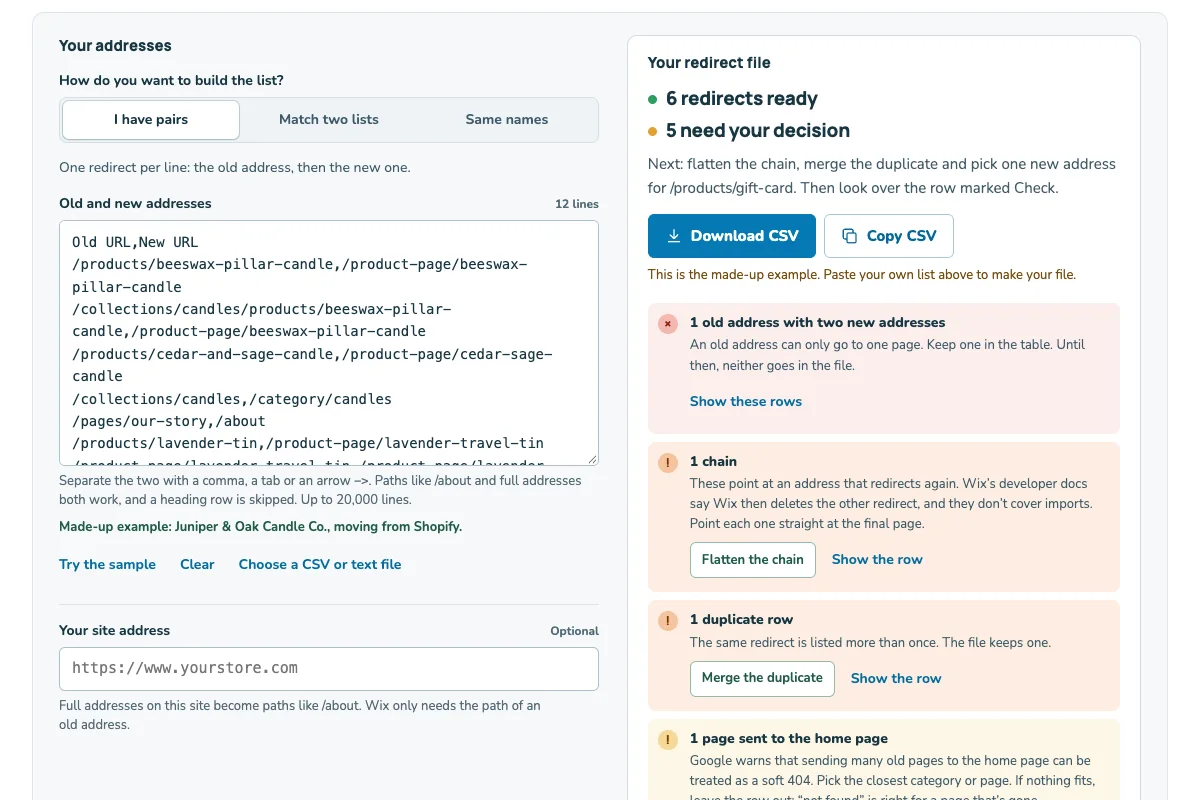
For a long list, the Wix redirect builder checks for chains, loops and duplicates.
Sources: Google: Moving a site with URL changesWix: Checking that your 301 redirects work
6. Where should a removed page go?
Send a removed page to its closest match, such as a product that replaces it. Juniper & Oak merged two fig candle sizes into one product, so both old addresses point there. Google says that is fine when you merge pages into one new page.
Don’t send many old addresses to your home page. Wix’s 404 help page says you can redirect a removed page there. But Google says this can confuse people. It may also be treated as a soft 404: a page that loads, but that Google counts as missing.
When nothing fits, let the old address show a 404, the “page not found” answer. Google says a 404 isn’t necessarily a problem when a page was removed with no replacement. And Wix’s 404 page still offers visitors a button to your home page.
That is why the final plan above has no redirect for Juniper & Oak’s beeswax tealights. The store stopped selling them, and nothing on the site is close.
Sold out but coming back? Read whether to keep or redirect out-of-stock products first.
Sources: Google: Moving a site with URL changesWix: About the Wix 404 error pageGoogle: Page indexing report (Search Console)
7. Check that each redirect works
Give a new redirect a few minutes. Then open a private window, type the old address into the address bar and see where you land. A private window shows what a new visitor sees. If you renamed a page more than once, test its oldest address too.
In Google Search Console, the Page indexing report may list an old address as Page with redirect. That is expected: Google doesn’t index the old address. The new page may or may not be indexed, so look up the new address too. Redirect error is different. It can mean a chain that is too long, or a loop.
Keep your redirects. Google says to keep them as long as possible, generally at least one year. In Wix, a deleted redirect can’t be recovered.
For the other statuses in that report, see how to read Search Console for a Wix store.
Sources: Wix: Checking that your 301 redirects workGoogle: Page indexing report (Search Console)Google: Moving a site with URL changesWix: Setting up a 301 redirect for a page
A redirect plan you can copy
Copy Juniper & Oak’s made-up plan into your notes. Swap in your own addresses, one old address per line.
Juniper & Oak Candle Co. redirect plan (made up)
Old address → final page
/products/cedar-sage-candle → /product-page/cedar-sage-candle
/products/cedar-candle → /product-page/cedar-sage-candle
/products/fig-candle-6oz → /product-page/fig-candle
/products/fig-candle-12oz → /product-page/fig-candle
/collections/gift-sets → /category/gift-sets
/pages/our-story → /about
/pages/candle-care → /candle-care
/products/beeswax-tealights → no redirect (gone, nothing close)
Every final page is live: [yes / not yet]
No final page is also an old address: [checked / not yet]
Current redirects exported as a backup: [date]
Redirects in each file: [up to 500]
Test row imported and tried: [old address, date, result]
All old addresses tried in a private window: [date]
Made-up store and addresses. Test one row first. In your CSV file, row 1 holds the column headers. Below it, put each old address in column 1 and its final page in column 2. Leave out rows with no redirect.