
WIX STORE SETUP
How do I move my store to Wix without losing Google traffic?
Keep your old web addresses where Wix lets you. Redirect the rest with a group redirect or a CSV file. Keep the new site out of search until those redirects work. At launch, connect Google Search Console. Mark contacts as email subscribers only if your records show they agreed.
In this guide
YOUR CHECKLIST
Check off each step of your move
Work through the steps in order. Check each one off when it’s done, and add notes as you go.
Your work stays on this page. Copy or download it before you leave. Your notes include any boxes you left unchecked.
1. Can you keep the same addresses?
Wix’s move guide says to reuse your old addresses where you can. Where you can’t, add a 301 redirect: a permanent forward from an old address to its new one.
Plain pages often match easily, but Shopify puts its pages under /pages/. A Wix page’s address is your domain plus a short name, such as /about. Products and blog posts follow a pattern instead. Wix puts products under /product-page/ and posts under /post/. The last part of the address, the slug, is usually based on the product name or post title.
In SEO & GEO → Tools and settings → SEO Settings, choose Products, then Edit beside Page URL. You can change the product prefix there. Wix warns that a wrong change can hurt your ranking, so decide before launch. If you want your old prefix, such as products, check that Wix accepts it first.
The product CSV has no column for a product’s slug. If your old product addresses used other words, redirect each one.
Sources: Wix: Keeping your Google rankings when you move to WixWix: Changing your URL structure in SEO SettingsWix: Importing products from another platform
2. What Wix moves for you, and what it doesn’t
Wix points to two routes for moving products from another platform.
The first is Wix’s product CSV. Export your products from your old platform, then fill in Wix’s template. In Wix’s newer product catalog, one file holds up to 10,000 rows and 15 MB. Each variant and image takes its own row, so 10,000 rows can mean far fewer products. Digital products can’t be imported this way.
The second is Cart2Cart, a separate app that charges for the move. Wix says it works from Shopify and many other platforms. It can move products, orders and coupons, up to 1,000 products and 1,000 orders.
What happens to your blog depends on your old platform. Wix can import WordPress posts with their text, images, dates and alt text, but not authors, tags or comments. Wix says Squarespace posts can’t currently be imported.
Wix’s help for the product CSV and Cart2Cart doesn’t mention redirects. Its WordPress import makes none, and Wix suggests adding one for each post. Plan them yourself.
Sources: Wix: Importing products from another platformWix: Moving your store with Cart2CartWix: Importing blog posts from WordPressWix: No blog import from Squarespace
3. Map old addresses to new ones
| Old page | Typical old address | Wix default |
|---|---|---|
| Shopify product | /products/[name] | /product-page/[name] |
| Shopify product in a collection | /collections/[collection]/products/[name] | /product-page/[name] |
| Shopify collection | /collections/[name] | /category/[name] |
| Shopify page | /pages/[name] | /[name] |
| Shopify blog post | /blogs/[blog]/[name] | /post/[name] |
| WooCommerce product | /product/[name] | /product-page/[name] |
| WooCommerce category | /product-category/[name] | /category/[name] |
| Squarespace 7.1 product | /[store page]/p/[name] | /product-page/[name] |
| Squarespace blog post | /[blog page]/[name] | /post/[name] |
List your old addresses: products, categories, pages and posts. Start with the ones that get visits or have links. Next to each one, write its new Wix address. Google’s move guide calls this URL mapping and says to include images and videos too. Wix’s redirect help doesn’t mention images, so start with your pages.
The table shows typical patterns. Yours may differ: WooCommerce and Squarespace let owners change parts of them, and Shopify’s are examples from its developer docs. Squarespace post addresses can also include dates.
Several old addresses can lead to one new page when the content is the same. Shopify can show each product at its own address and again inside each collection. So one product can have many old addresses. All of them can go to the one Wix product page. But don’t send unrelated pages to your home page. Google says that can be treated as a soft 404: a page it counts as missing.
Some old addresses have a question mark, such as ?variant= or ?p=. Wix’s help pages don’t say whether a redirect can match them, so test one first.
Dropping some products in the move? See where to send removed pages in the Wix redirects guide.
Sources: Google: Moving a site with URL changesWix: Your site’s default SEO settingsShopify: Product addresses inside a collectionWooCommerce: PermalinksSquarespace: URL slugs
4. Set up the redirects
| Old address | New Wix address | How |
|---|---|---|
| / | / | Same address, no redirect |
| /products/cedar-candle | /product-page/cedar-candle | Group redirect |
| /collections/candles/products/cedar-candle | /product-page/cedar-candle | CSV row (same product) |
| /collections/candles | /category/candles | CSV row |
| /pages/about-us | /about-us | CSV row |
| /blogs/news/wick-care | /post/wick-care | CSV row (test one first) |
Start with a group redirect if only the first part of your addresses changed. Go to SEO & GEO → Tools and settings → URL Redirect Manager. Click + New Redirect, then Group redirect. One older Wix page calls the button + Create New Redirect. Wix’s own example moves every address under /products/ to /product-page/ in one step. The rest of each address must stay the same. A group redirect can’t send many pages to one page or start from your home page.
Put everything else in a CSV file: a header row, then two columns, old address and new address. Upload it from More Actions → Import redirects. Each file takes up to 500 redirects, and a site can have 5,000. Each one takes a few minutes to start working. Wix’s move guide says you can’t redirect to a blog page. Its newer redirect page says to redirect changed blog posts by hand. Test one post first.
Timing matters. Redirects need a Premium plan and a connected domain, and an import fails if the domain isn’t connected yet. So build the new site hidden from search, as Wix suggests. Turn off “Let search engines index your site” in SEO Settings. Have your files ready for launch day.
Connecting your domain can take up to 48 hours. Meanwhile, your old site may still show, and email to your domain may not arrive. Wix recommends its name servers. Wix then holds all your DNS records, the settings that send your domain’s visitors and email to the right place. Wix copies your mail (MX) records, but some email services need others, such as TXT or CNAME. Re-add those, and any records for subdomains or site verification. Pointing, the other method, leaves email records alone. If you use Cloudflare, turn off its proxy first. Wix doesn’t support DNS proxies.
Wix renames menus now and then. These labels match its help pages in October 2026.
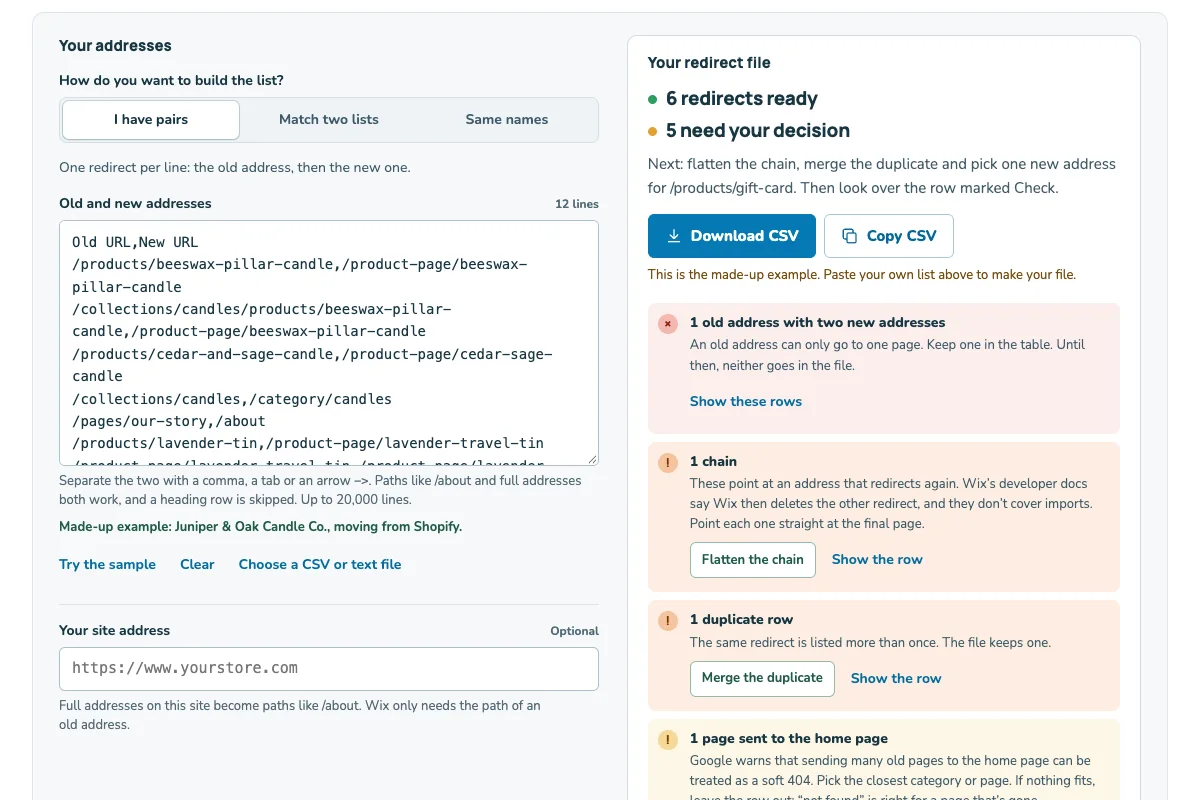
The Wix redirect builder turns your old and new addresses into a file for the URL Redirect Manager, and catches chains, loops and duplicates.
Sources: Wix: Keeping your Google rankings when you move to WixWix: Creating a group redirectWix: Importing redirects from a CSV fileWix: Setting up a 301 redirectWix: About domain propagationWix: Name servers or pointingWix: Connecting a domain to Wix’s name servers
5. Launch day and the weeks after
- Publish your site, if you haven’t yet.
- Type a few old addresses into a private browser window. Each one should open its new page.
- As soon as the redirects work, turn “Let search engines index your site” back on in SEO Settings.
- Go to SEO & GEO → Tools and settings → SEO Setup Checklist. Finish Step 1, then click Connect to Google. Wix then sends Google your sitemap.
- In Search Console, open the Sitemaps report. Check that sitemap.xml is listed, or add it there.
Every Wix site has a sitemap at /sitemap.xml that updates itself. Connecting Search Console needs the same Premium plan and connected domain as redirects.
In the weeks after, watch Search Console. Google’s move guide names the Sitemaps and Index Coverage reports (now called Page indexing), your search queries and the URL Inspection tool. Google says most pages of a small or medium site can take a few weeks to move. It also says rankings can go up and down during a move.
Google suggests making big changes one at a time. So keep your domain for the move if you can. Send each old address straight to its final page, and keep the redirects for at least a year. Google’s Change of Address tool is only for moving to a new domain, so skip it if you keep yours. If you do change domains, Wix says to connect the old one as a secondary domain.
Search Console says some pages are not indexed? Read what each status means on Wix.
Sources: Wix: Submitting your sitemap to search enginesWix: Keeping your Google rankings when you move to WixGoogle: Moving a site with URL changes
6. Titles and descriptions after the move
Wix says SEO tags, such as titles and descriptions, can’t currently be added by importing a CSV file.
Wix fills product titles from a pattern instead. By default, that is the product name, a bar, then your site name. Check the pattern against your real product names. Then, by hand, copy the titles that brought visits to your old store onto those same pages.
For how patterns work and how Google shows titles, see Wix SEO titles and descriptions.
Sources: Wix: SEO tags can’t be imported from a CSV fileWix: Your site’s default SEO settings
7. Move your email list with consent
Wix imports contacts from a CSV file. Go to Contacts, open the drop-down next to Create New, choose Import, then Get Started under CSV file. Each file must hold fewer than 20,000 contacts and be saved as UTF-8. Every row needs an email address or phone number.
One box, “Mark as email subscribers”, applies to the whole file. Wix says to select it only if every contact in that file agreed to join your mailing list. So split your list into two files: people who agreed, and everyone else. Use more files if a group has 20,000 people or more. Shopify’s customer CSV has an “Accepts Email Marketing” column, marked yes or no, to help with the split. Don’t send campaigns to the second file. It may include people who opted out.
In the US, the FTC says you can’t sell or transfer the address of someone who opted out. The one exception is a company you hire to help you comply. These sources don’t say whether an old agreement covers email sent from a new platform.
So check your own consent records before you select that box. This is not legal advice.
Sources: Wix: Importing contacts from a CSV fileShopify: Importing and exporting customersFTC: CAN-SPAM Act compliance guide for business
A move plan you can copy
Copy this into your notes. Fill in each line as you plan the move.
My move to Wix
Store and old platform: [name] on [Shopify / WooCommerce / Squarespace / other]
Domain: [yourstore.com]. Keeping it: [yes / no]
Product prefix on Wix: [product-page, or the one I set]
Group redirect: [old path] → [new path]
Redirect files: [number] CSV files, 500 redirects at most in each
Addresses to test first: [blog posts, addresses with a ?]
Email and verification records to re-add: [type and value of each]
Launch day: [date]. Indexing back on at: [time]
Contacts who agreed (file 1): [number]
Everyone else (file 2): [number]
Keep redirects until at least: [one year after launch]
Fill this in with your own store’s details. Your Wix dashboard shows what is actually set up.