
WIX APPS
Will a pop-up hurt your Wix store in Google search?
It may, if it covers the page. Google advises against pop-ups that hide the main content. It suggests a small bar that is easy to close, even for email sign-ups. In the Wix Editor, popups are hidden on your mobile site unless you turn them on.
In this guide
1. What Google says about pop-ups
| What appears | In 2016, Google called it |
|---|---|
| A pop-up that covers the main content, on arrival from search or while reading | Intrusive |
| A box visitors must close before they see the page | Intrusive |
| A page whose top looks like that box, with the content pushed below | Intrusive |
| A notice the law requires, such as for cookies or an age check | Not affected, if used responsibly |
| A login box where the content isn’t public | Not affected, if used responsibly |
| A banner that uses a reasonable part of the screen and is easy to close | Not affected, if used responsibly |
Google now says some of that 2016 post may be outdated, and points to its current page instead. Google calls a box over the whole page an interstitial, and one over part of the page a dialog. Either is intrusive when it blocks the content. Its current page says not to cover the whole page with one. It suggests a banner that takes up a small part of the screen instead. It says a newsletter sign-up can go in one. It gives no exact size, so judge it on a real phone.
Today’s page still makes an exception for notices the law requires, such as an age check. Even then, Google recommends showing them on top of the page, not on a separate page. That way, Google can still read some of the content.
Sources: Google: avoid intrusive interstitials and dialogsGoogle (2016): helping users easily access content on mobile
2. Does a pop-up lower your Google ranking?
A ranking signal is something Google uses to decide the order of its results. Google’s current pages don’t call pop-ups one, but they still warn against them. Its page on pop-ups says intrusive ones make your content hard for search engines to understand, which “may lead to poor search performance.”
Google’s page experience guide still asks whether your pages avoid intrusive pop-ups. Yet the only part it says its ranking systems use is Core Web Vitals. These are three scores: how fast the main content loads, how fast the page reacts to a tap, and how much it shifts. Google adds that the other parts of page experience don’t directly help a page rank higher. But it says they make a site more satisfying to use, which generally fits what its ranking systems reward.
The 2016 post was more direct. It said these pages might not rank as high in mobile search. A 2017 update to it called this one of hundreds of signals.
So here is the careful answer. Google advises against pop-ups that cover the page, but its current pages don’t confirm a direct ranking effect. A pop-up can still affect Core Web Vitals. An app adds code that can slow a page, and a bar that pushes the page down makes it shift.
To test whether an app slows a page, read our guide to Wix apps and page speed.
Sources: Google: avoid intrusive interstitials and dialogsGoogle: understanding page experience in SearchGoogle (2016): helping users easily access content on mobile
3. Check your Wix popups
- In the Wix Editor, open Pages & Menu → Popups.
- Select the popup, click it on the canvas, then click Set Triggers.
- Find the setting “Automatically display popup on pages” and choose No if it should open only from a button or link you add.
- If it stays on Yes, check Which pages is it on?, the Delay slider (not every popup has one) and Popup Scheduling.
- In the mobile editor, open Popups, select the popup and click the Settings icon. If Automatically display popup on pages says Yes, it opens on phones.
Wix’s help now calls them Popups, though some Wix pages and web addresses still say lightboxes. These steps are for the Wix Editor, and Wix may move these screens.
In Wix Studio, add a popup from Add Elements → Layout Tools → Popups. Its Delay slider sets how many seconds it waits after the page loads. In Wix Harmony, use + Add → Elements → More Options → Popup. You can delay it by up to one minute.
A delay changes when a popup opens, not how much it covers. Google’s pages on pop-ups don’t mention delays, scroll triggers or pop-ups that open as someone leaves.
Wix says only one popup per page can open by itself, in the Wix Editor, Studio and Harmony. Wix also says a popup can’t currently open when a visitor tries to leave. A popup has no web address of its own, and Wix advises against putting your main content in one.
In the Wix Editor, popups are hidden on your mobile site by default. You can turn them on, but Wix’s own help warns that Google counts these mobile pop-ups as intrusive. It says they might hurt your SEO. Google’s own pages are narrower: they object to pop-ups that block the content. Wix’s pages for Studio and Harmony don’t state the same mobile default, so check the mobile view there.
Sources: Wix: adding and setting up popupsWix: showing popups on your mobile siteWix: mobile pop-ups with a subscribe formWix: using popups in the Studio EditorWix: adding popups in the Harmony editorWix: triggering a popup when a visitor tries to leave
4. What about pop-up apps?
A pop-up app from the Wix App Market is separate from Wix popups. Wix lets app makers add an embedded script, which is code the app puts on your site. Wix’s developer docs name pop-ups as one use. Wix’s guide for app makers also says this code goes onto every page. So an app’s code may load even on pages where its pop-up never opens.
Wix’s one-popup limit and the Wix Editor’s mobile default are written for Wix popups. Don’t assume they apply to an app. Check the app’s own settings for pages, timing and phones. Google’s advice is the same whoever made the pop-up: don’t cover the page. In a 2023 question-and-answer session, Google said forms play no special role in ranking. It added that a form shown in a box over the page might affect how visitors experience your site.
Also check whether two boxes open on one page, such as a Wix popup and an app’s pop-up. Count the cookie notice too.
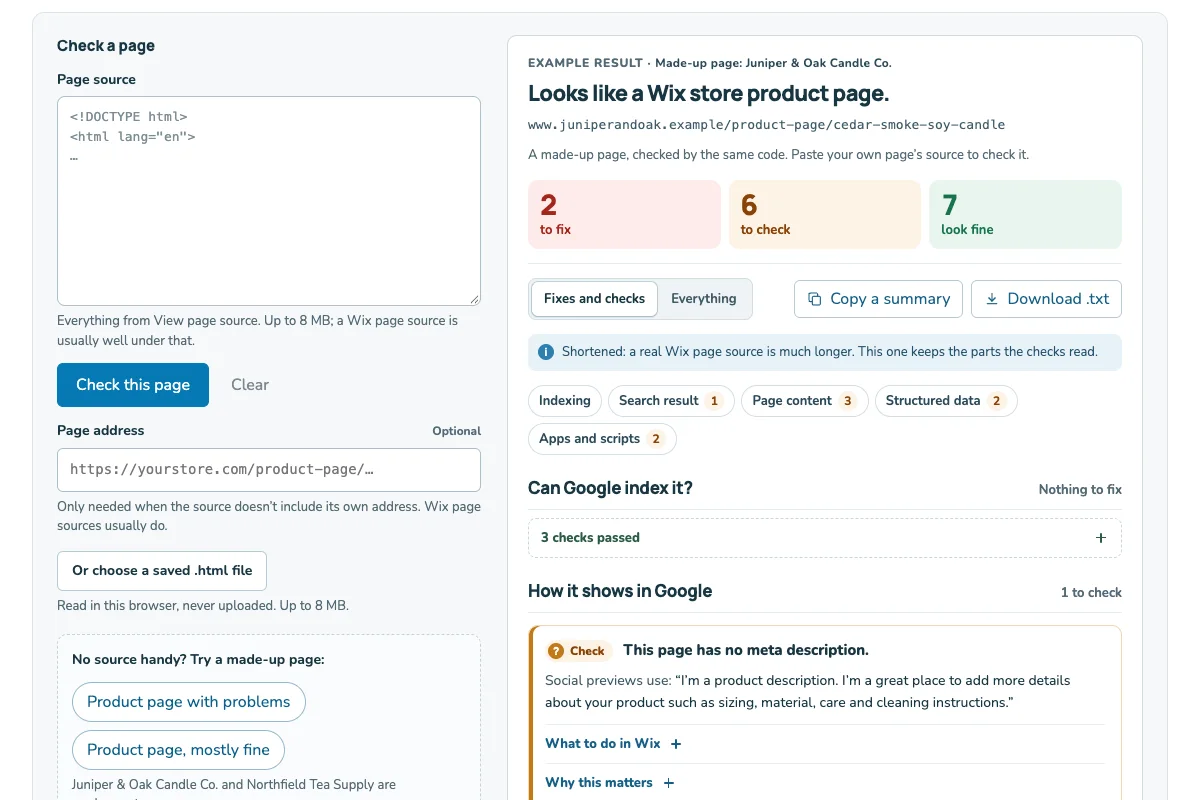
To see the apps installed on your site and its Custom Code, paste a page’s source into the Wix page checker.
Removed a pop-up app and still see its pop-up? Read how to clean up leftover app code.
Sources: Wix Developers: about embedded scriptsWix Developers: add an embedded script with the Wix CLIGoogle: avoid intrusive interstitials and dialogsGoogle: SEO office hours, July 2023
5. A worked example: one store’s pop-ups
| What opens | What Google says | Safer choice |
|---|---|---|
| Full-screen 10% off box, on arrival | Advises against covering the page | A small bar at the bottom |
| Full-screen tea quiz, after 10 seconds | Same advice: don’t cover the page | Open it from a button |
| Sign-up bar, easy to close | Suggests small banners for sign-ups | Keep it; check it on phones |
| Cookie notice | Exempt when the law requires it | Keep it; avoid a page jump |
| Join button that opens a popup | Not in its examples; the shopper opened it | Keep it |
Northfield Tea Supply is a made-up store. Its owner listed every box that opens on the shop’s pages. Then they compared each one with Google’s advice.
Two boxes changed. The 10% off box became a small bar at the bottom of the screen. The owner checked that it never shows on the same page as the sign-up bar. The tea quiz now opens only when a shopper taps a Find your tea button. Waiting ten seconds had not changed how much of the page it covered. The other three boxes stayed as they were.
Use the pop-up check near the end of this guide to list your own boxes the same way.
Sources: Google: avoid intrusive interstitials and dialogsGoogle (2016): helping users easily access content on mobile
6. Collect emails without a big pop-up
A small bar that is easy to close fits Google’s advice. If your app or popup can be one, start there. Wix also gives you ways to ask that don’t cover the page.
Add a subscribe form to a page. In the Wix Editor, open Add Elements → Contact & Forms. Scroll to the Subscribe section and drag a form onto the page. Sign-ups land in Contacts with a Subscriber label. Your footer is one place to try.
Add a Subscribe field to a form you already use, such as a contact form. The form needs an email field.
Open a popup from a button. Set it not to open by itself, then link a Join our list button to it. The shopper chooses to see it. Then tap the button on your phone to check it opens there.
Ask at checkout. Go to Checkout Settings, click Edit under Checkout form, and turn on the Subscription opt-in checkbox toggle. Keep Checked by default unselected, so each shopper decides.
We can’t tell you which of these will bring the most sign-ups for your store. Change one thing at a time. Then compare new subscribers in Contacts across periods of the same length.
Sources: Google: avoid intrusive interstitials and dialogsWix: adding and setting up a subscribe formWix: adding a subscriber opt-in checkbox to a formWix: adding and setting up popupsWix: customizing the checkout page
7. Check it on a phone, like a shopper from Google
- On your phone, open a private window in your browser.
- Search Google for your store’s name and a product. Tap your result.
- Stay on the page for a minute, and scroll down once.
- Note what opens, how much of the screen it covers and how you close it.
- Repeat on your home page and a category page.
Google’s concern is the moment a shopper lands from search, so test that moment. A private window shows the site the way a new visitor sees it. That matters because some popups show only once per visitor.
Ask three questions on each page. Can you still see the product name, the price and the Add to Cart button? Can you close each box with one tap? Does the page jump when a bar appears?
If something covers the page, find where it comes from. Check your Wix popups first, then your apps. Write down what you find in the pop-up check below.
Sources: Google (2016): helping users easily access content on mobileWix: using popups in the Studio Editor
A pop-up check you can copy
Copy this into your notes. Fill in one copy for each page you test on your phone.
My pop-up check
Page I tested: [address]
How I got there: [Google search on my phone, in a private window]
What opened: [Wix popup / app pop-up / cookie notice / nothing]
Where it comes from: [popup name or app name]
When it opened: [right away / after a delay / when I scrolled / when I tapped a button]
How much of the screen it covered: [all / most / about half / a small bar]
I could still see the product name, price and Add to Cart: [yes / no]
I could close it with one tap: [yes / no]
The page jumped when it appeared: [yes / no]
What I will change: [one change, or none]
Date I will check again: [date]
This sheet records what you saw on one visit. It does not measure your Google ranking.